
Products
Solutions
Resources


Sequential testing explained: Benefits, tradeoffs, and practical uses

Sequential testing can help you make earlier A/B test decisions, but it isn’t right for every experiment. Here’s how it works, what to consider, and how to use it in Statsig.
Imagine you’re planning a four-week A/B test on a new checkout experience. What if the new version shows a strong lift in conversion after just two weeks? You don’t want to delay a useful improvement, but stopping at the first promising result can increase the risk of declaring a winner when there’s no real improvement. How can you plan for a reliable earlier decision?
Sequential testing accounts for that possibility from the start. It gives you a way to evaluate results as an experiment runs and potentially act early while controlling the risk of false positives. To use it well, you need to understand both its strengths and its limitations.
In this blog, we’ll explain how sequential testing works, explore its benefits and tradeoffs, and walk through getting started in Statsig.
What is sequential testing?
Sequential testing is a statistical approach designed for evaluating results as data arrives, with the possibility of making a decision before reaching a planned sample size or end date.
In a traditional fixed-horizon A/B test, you decide how much data to collect upfront and wait until you reach that sample size before making a statistical decision. In practice, teams may check results along the way and stop as soon as they see apparent significance. In our checkout example, that could mean ending the test after two weeks because the conversion lift looks significant. But early results can fluctuate by chance. Repeatedly checking and stopping at the first impactful result increases the risk of a false positive: declaring a winner when there’s no real improvement. This is known as the peeking problem.
Sequential testing accounts for those repeated checks. If the results meet its stopping criteria, you may be able to act early. Otherwise, you continue collecting data until a stopping rule is met or the experiment reaches its planned limit.
How does sequential testing work?
Sequential methods account for repeated checks when calculating how much evidence is needed to make a decision. This keeps the overall risk of false positives under control as results accumulate.
There are several approaches to sequential testing, such as alpha-spending methods, which allocate the allowable false-positive risk across interim analyses, the Sequential Probability Ratio Test (SPRT), and its mixture variant, mixture Sequential Probability Ratio Test (mSPRT).
(Statsig supports SPRT and an mSPRT-based approach: both support early decisions, but they evaluate evidence differently. In this blog, we’ll focus on these two methods.)
Let’s return to our checkout example to see how each method works. Both start with the same question: does the new experience improve conversion? The team randomly assigns users to the existing or new checkout, uses conversion as its primary metric, and monitors payment errors as a guardrail.
SPRT: Compare two explanations
What is SPRT?
The Sequential Probability Ratio Test (SPRT) compares two hypotheses: no effect (the null hypothesis) and a specific effect defined before the experiment (the alternative hypothesis). In our checkout example, the null hypothesis is that the new experience leaves conversion unchanged, while the alternative is that it improves conversion by 3% relative to the existing checkout. For simplicity, this example tests for an improvement; a two-sided test can detect changes in either direction.
As data arrives, SPRT calculates a likelihood ratio. To calculate it, the test first uses a statistical model to determine how likely the observed conversion results would be under each hypothesis, accounting for sample size and random variation. It then divides the likelihood under the specified improvement by the likelihood under no effect. A ratio of 10 means the data is 10 times as likely under the alternative hypothesis (improvement) as under the null hypothesis (no effect).
The test compares this ratio with two stopping boundaries determined by the team’s tolerance for false positives (alpha) and for missing the specified effect (beta). Crossing the upper boundary favors the specified effect; crossing the lower boundary favors no effect. Between the boundaries, the test continues collecting data.
In Statsig, this is available through the SPRT Analytics Type.
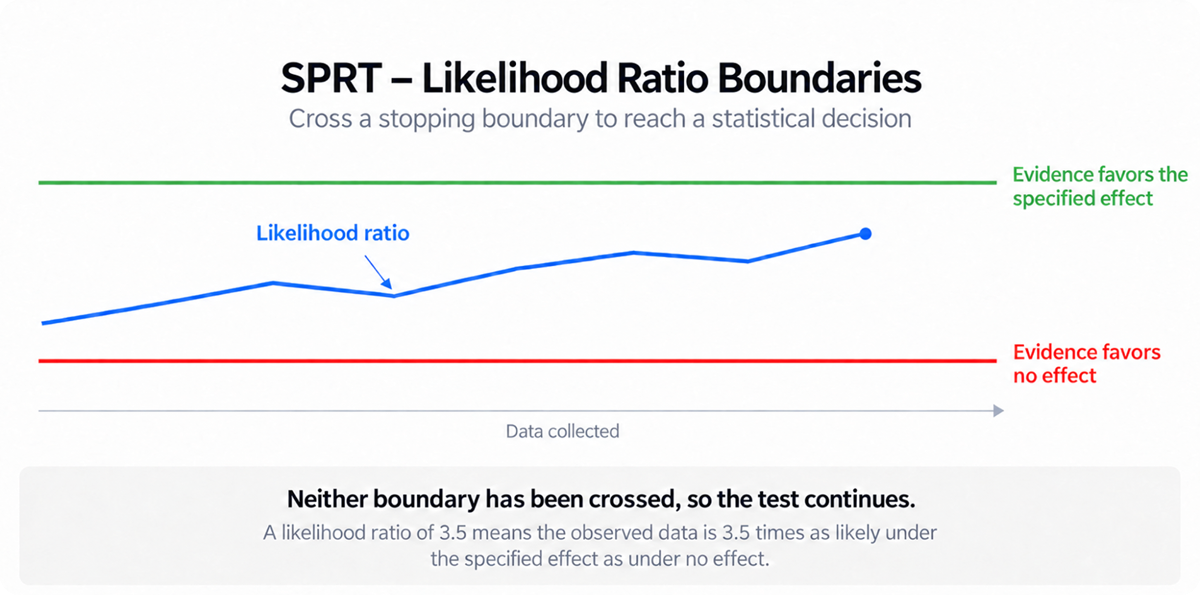
The high-level process
Define the target effect. Suppose the team specifies a 3% relative conversion improvement and supplies the baseline metric information needed for the analysis.
Set the stopping rules. The team chooses acceptable error rates, which determine the decision boundaries, and agrees on a practical limit for the experiment.
Review the evidence. As users complete checkout, the test updates the likelihood ratio and compares it with the boundaries.
Stop or continue. If a boundary is crossed, the team can reach a conclusion. Otherwise, it continues collecting data until a boundary is crossed or the practical limit is reached. If the limit arrives without a crossing, the result is inconclusive.
Suppose the likelihood ratio crosses the boundary favoring the specified improvement after two weeks. If the payment-error guardrail criteria and other requirements are also met, the team could consider an earlier rollout. Crossing the boundary favoring no effect does not prove the two experiences are identical; it means the data favors no effect over the specific improvement being tested.
mSPRT: Consider a range of possible effects
What is mSPRT?
The mixture Sequential Probability Ratio Test (mSPRT) follows a similar principle, but compares no effect with a range of possible effects rather than one specified alternative. The “mixture” refers to how the method combines and weights those possibilities.
For our checkout experiment, instead of considering only a 3% improvement, mSPRT considers a continuous distribution of possible conversion effects and weights them according to the distribution specified by the model (for illustration, effects around 1%, 3%, or 5%). It calculates how likely the observed data would be under those effects and combines the results using the model’s weights. It then divides this combined likelihood by the likelihood under no effect to calculate a likelihood ratio, which measures how strongly the data supports the range of possible effects over no effect.
Like SPRT, mSPRT accounts for repeated checks as data accumulates, but that flexibility to check results repeatedly comes with a tradeoff in statistical power: the ability to detect a real effect. Compared with a traditional test analyzed once at its planned endpoint, mSPRT may require more data to detect the same improvement, especially when the effect is small. Strong effects can still support an early decision, but an earlier answer isn’t always guaranteed.
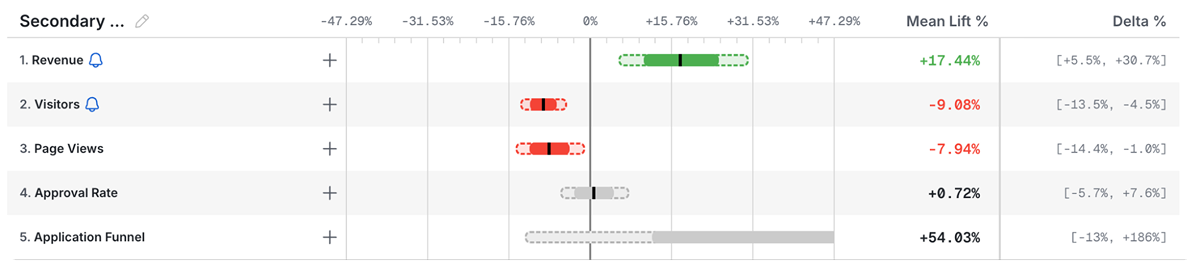
Statsig brings this approach into its Frequentist Analytics Type with Sequential Testing enabled, which translates the evidence into adjusted p-values and confidence intervals that control the risk of false positives across repeated checks. Statsig makes this adjustment visible in the results chart: dashed “wings” extend the standard confidence interval to account for repeated checks.

The solid green bar shows the standard confidence interval, and the dashed wings show the sequentially adjusted interval. Here, the full adjusted interval stays above zero, indicating a statistically significant improvement.
The high-level process in Statsig
Plan the experiment. As with a traditional A/B test, the team chooses the effect size it wants to detect, its desired statistical power, its acceptable false-positive rate, and a target duration.
Define an early-win rule. For example, the sequentially adjusted 95% confidence interval for conversion lift must be entirely above zero, and predefined guardrail criteria must also be met.
Review adjusted results. With Sequential Testing enabled, the team checks results daily using the adjusted confidence interval, which accounts for repeated checks.
Act or keep collecting data. If the early-win criteria are met, the team can consider a rollout. Otherwise, it continues to the planned endpoint, where the result may still be inconclusive.
Suppose that after two weeks, the sequentially adjusted confidence interval shows a relative conversion lift between +1% and +4%. Because the interval is entirely above zero, it meets the statistical early-win rule. If the payment-error guardrail criteria and other planned requirements are also met, the team could consider an earlier rollout.
What are the benefits and tradeoffs?
Sequential testing lets teams act before an experiment’s planned end when the evidence supports a decision, but it also comes with tradeoffs.
Benefits
Review results and make decisions sooner. Sequential testing lets you assess whether there’s enough evidence to act while the experiment is running. In our checkout example, a clear conversion improvement could support an earlier launch.
Catch harmful changes earlier. If the new checkout reduces conversion, an earlier decision can limit how many users encounter it. Obvious bugs or serious user harm may also warrant immediate action, regardless of statistical significance.
Use time and traffic more efficiently. Reaching a conclusion early can free up resources for other experiments and unblock the next product decision.
Tradeoffs and limitations
You may need more data to detect small effects. Accounting for repeated checks can require stronger evidence. Depending on the method, small effects may need more data than a fixed-horizon analysis, even though large effects may support an earlier decision.
An early estimate may overstate the impact. Stopping as soon as a result looks strong tends to capture an unusually large estimate, a form of the winner’s curse. The sequentially adjusted confidence interval protects against false positives, but it doesn’t remove the upward bias in the point estimate. If you need a reliable estimate for forecasting or planning, keep the experiment running to collect more data before committing to an impact figure.
Allow time for weekday and weekend behavior. Statsig recommends waiting at least seven full days before declaring a winner, even if results look significant sooner. This helps account for differences in user behavior across the week.
One positive metric doesn’t establish that the change is safe. Conversion may improve before you have enough data to assess refunds or support requests. A guardrail with no statistically significant change doesn’t rule out harm; it may simply need more data.
SPRT is built around one specific effect. If the true lift is real but smaller than the target effect you specified, the test may take much longer to reach a boundary, or it may favor no effect even though a smaller improvement exists.
Some outcomes take time. Sequential testing cannot make a 30-day retention metric mature sooner. Early results may also reflect novelty effects, when users react to something new before their behavior settles.
It requires the right statistical setup. Running a standard significance test every day isn’t enough. Building and validating a sequential analysis requires expertise. A platform like Statsig can handle the calculations, while your team still chooses metrics, guardrails, and criteria for acting.
Sequential testing is most useful when an earlier decision has real value, such as launching an improvement or stopping a harmful change, and when the effect is large enough to become clear early. But that flexibility still requires enough data, reliable guardrails, and time for important outcomes to emerge.
Sequential testing isn’t a shortcut around limited traffic. Depending on the method, small effects or noisy metrics can require as much data as, or more than, a fixed-horizon test. If you can’t act sooner, need a precise estimate of impact, or are waiting for longer-term outcomes, continuing to the planned endpoint may be more useful than stopping early.
How to run a sequential test in Statsig
Statsig offers two options: SPRT Analytics Type and Frequentist Analytics Type with Sequential Testing enabled. Both support repeated evaluation, but use different readouts and decision rules.
SPRT
SPRT gives you explicit stopping boundaries for evidence favoring either the specified effect or no effect.
To enable it:
Open Setup → Advanced Settings and set Analytics Type to SPRT.
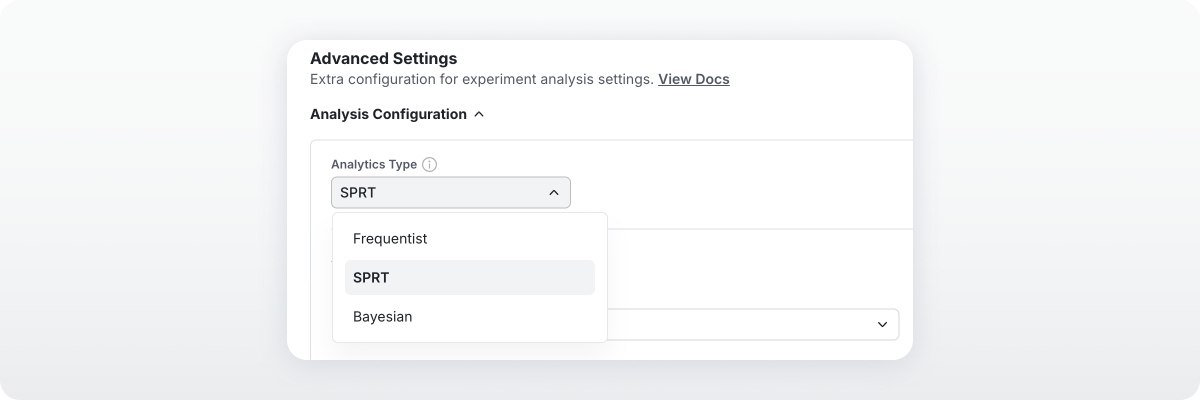
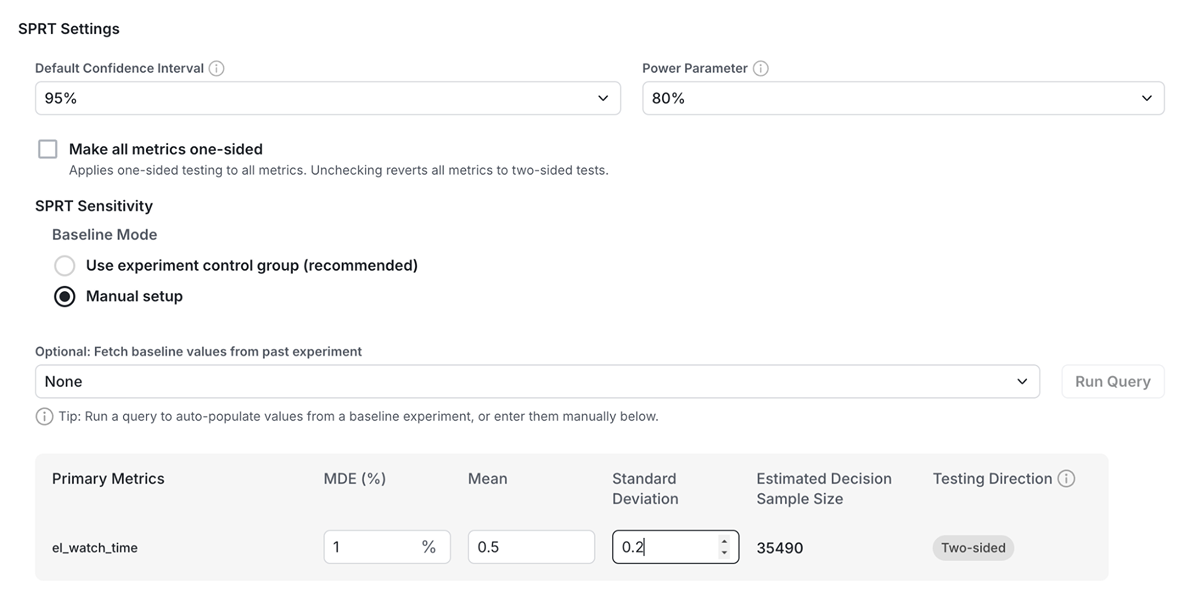
2. Before starting, provide each metric’s baseline mean, baseline standard deviation, and minimum detectable effect as a percentage. Statsig uses these inputs to calculate Cohen’s d, which expresses the target effect relative to the metric’s variability. You can select a previous experiment with similar users to help populate the baseline values.
3. Review the likelihood ratio and decision boundaries on the Results tab. When a metric crosses a boundary, you can favor the alternative or the null. In between, keep collecting data.
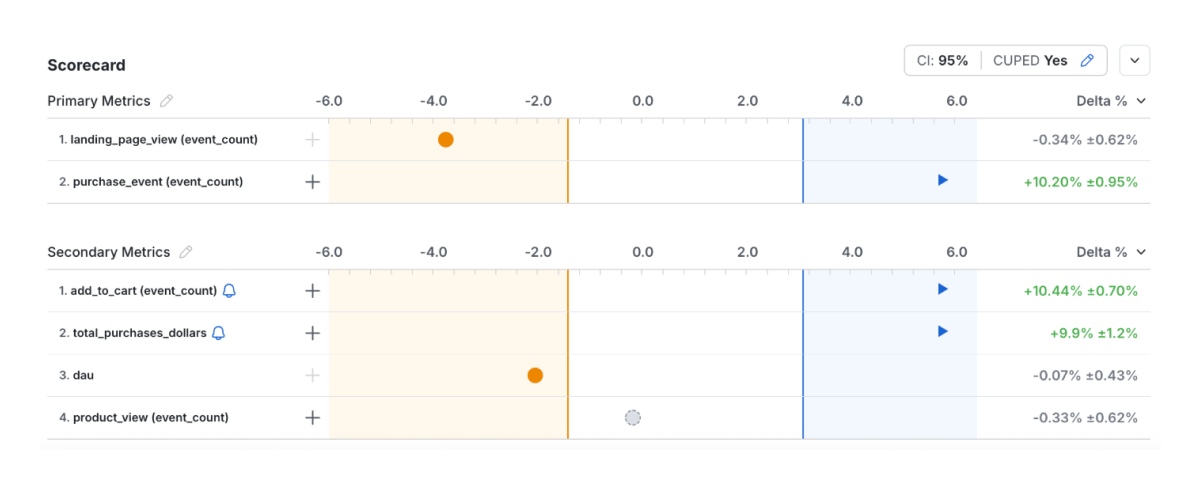
Choose SPRT if you want explicit stopping boundaries for evidence favoring either hypothesis, and can supply the required metric assumptions upfront. Statsig can also estimate how much data a decision is likely to need. Because SPRT allows unlimited looks, treat that as a planning estimate rather than a required sample size.
See the SPRT documentation for setup requirements.
Frequentist analysis with Sequential Testing
This is Statsig’s mSPRT-based option. It fits teams that want familiar frequentist reporting with adjusted p-values and can set a target duration up front.
To enable it:
Open Setup → Advanced Settings and set Analytics Type to Frequentist.
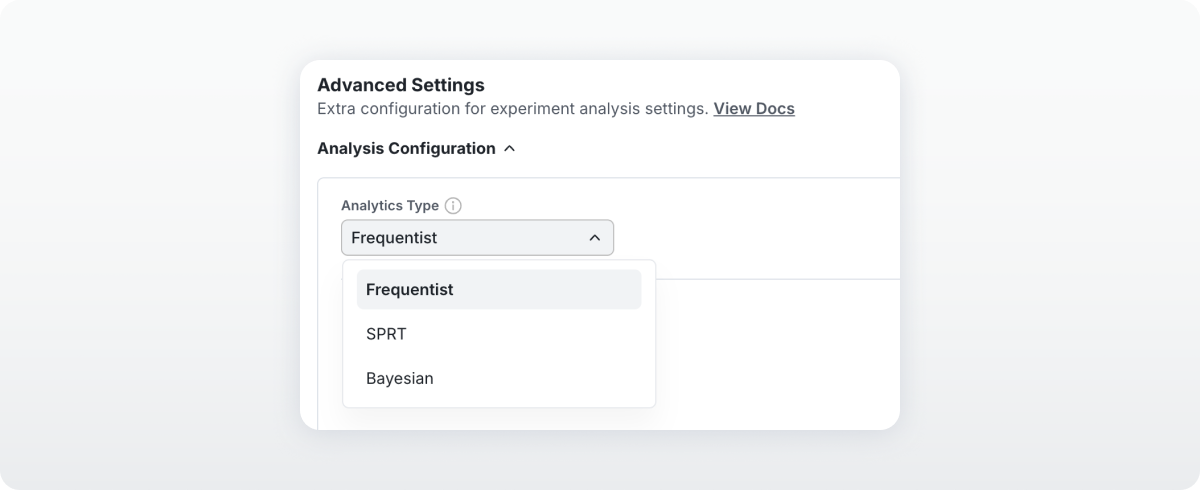
2. Set a target duration to enable Sequential Testing. Statsig’s built-in Power Analysis Calculator can help you estimate how long the experiment needs to run.

3. Under Analysis Settings, enable Apply Sequential Testing.

4. Evaluate early results using the adjusted confidence interval. If it overlaps zero, the result is not statistically significant yet.
Choose Frequentist with Sequential Testing if your team wants to keep familiar p-values and confidence intervals while allowing early decisions. It’s a natural fit for monitoring the experiment for a clear primary metric improvement or regression.
See the Sequential Testing documentation for configuration and interpretation details.
Making the decision
Sequential testing gives your team a way to act earlier when the evidence supports it. But the decision still depends on your guardrails, the outcomes you need to observe, and how precisely you need to measure impact. A useful experiment ends when it has answered the question well enough for the decision at hand.
Not sure whether sequential testing fits your next experiment? Talk to our team about your metrics and traffic, and we can help you choose the right approach.